I. SHOOTING YOUR OBJECTS USING TURNTABLE METHOD
Following are some tips for SHOOTING your object:
- ISO lowest value possible to avoid noise 200 iso
- Set a focal distance for your camera avoid using zoom (choose the standard focal length for your camera for example DSLR 55mm, Nikon full frame is 35mm, Canon full frame is 40mm)
- use manual mode for your camera (white balance, focus, focal length should not shift).
- Since your object should be in sharp focus, avoid shallow depth of field, suggest setting your aperture to at least F11 preferably F22
- Lighting: bright diffuse lighting, avoid shadows. Best scenario is diffuse daylight
- Turntable: it is possible to create even lighting using 2 sources
- Make sure there is contrast between the object and background (black object on dark grey background will create problems in Metashape masking). Use newspaper or patterned background
- Turntable method: use tripod + avoid changing anything in the scene except the rotating object. Set your focus and remove item to shoot background.
- Each photo should effectively use the framesize. Do not crop or geometrically transform the images.
- Avoid moving objects in scene (background) be aware of contrast
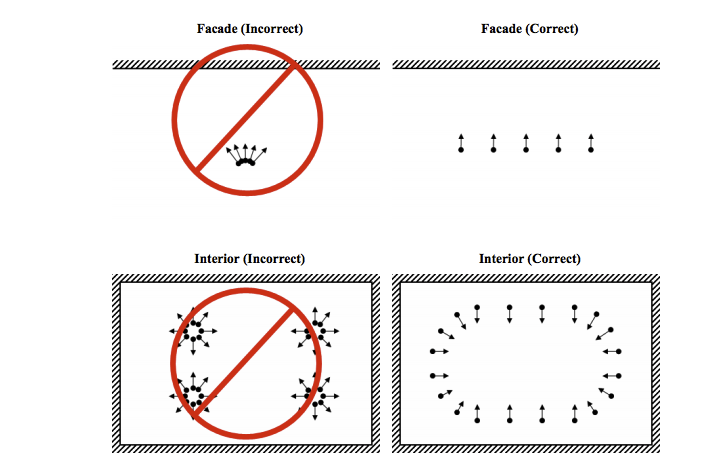
- Shoot pictures of the scene with significant overlap (60-80% overlap)(75-100 images is a good minimum).
- Capture most important scene content from multiple viewpoints (moving the object not the camera - top, bottom, and side) object must be able to hold its form.
Avoid transparent, reflective, glossy, or metallic objects. Some objects can become reflective with certain lighting environments. Avoid symmetrical and monochromatic objects. Size also makes a difference - a small figurine is difficult and needs more images to render than a large figurine. A flat object is also very difficult - if you can’t prop it up and shoot around it is probably a more difficult object to capture. Organic objects work the best, manufactured items tend to have qualities that make mesh generation difficult - please consult before choosing. Avoid symmetrical objects with similarities - example of are an orange or a cigarette pack, a coffee cup. It is recommended to significantly alter sides - take a bite out of an apple, use stickers, crush the cup and spill coffee on it. Organic objects from nature work best.
See Taylor's How to Video (Turntable)
Following are some tips for SHOOTING a scene:
- Avoid direct sunlight and sharp shadows
- shoot with significan overlap
- avoid reflective material: class, metallic fixtures that are not anodized or weather worn, mirror, etc. This will not work!
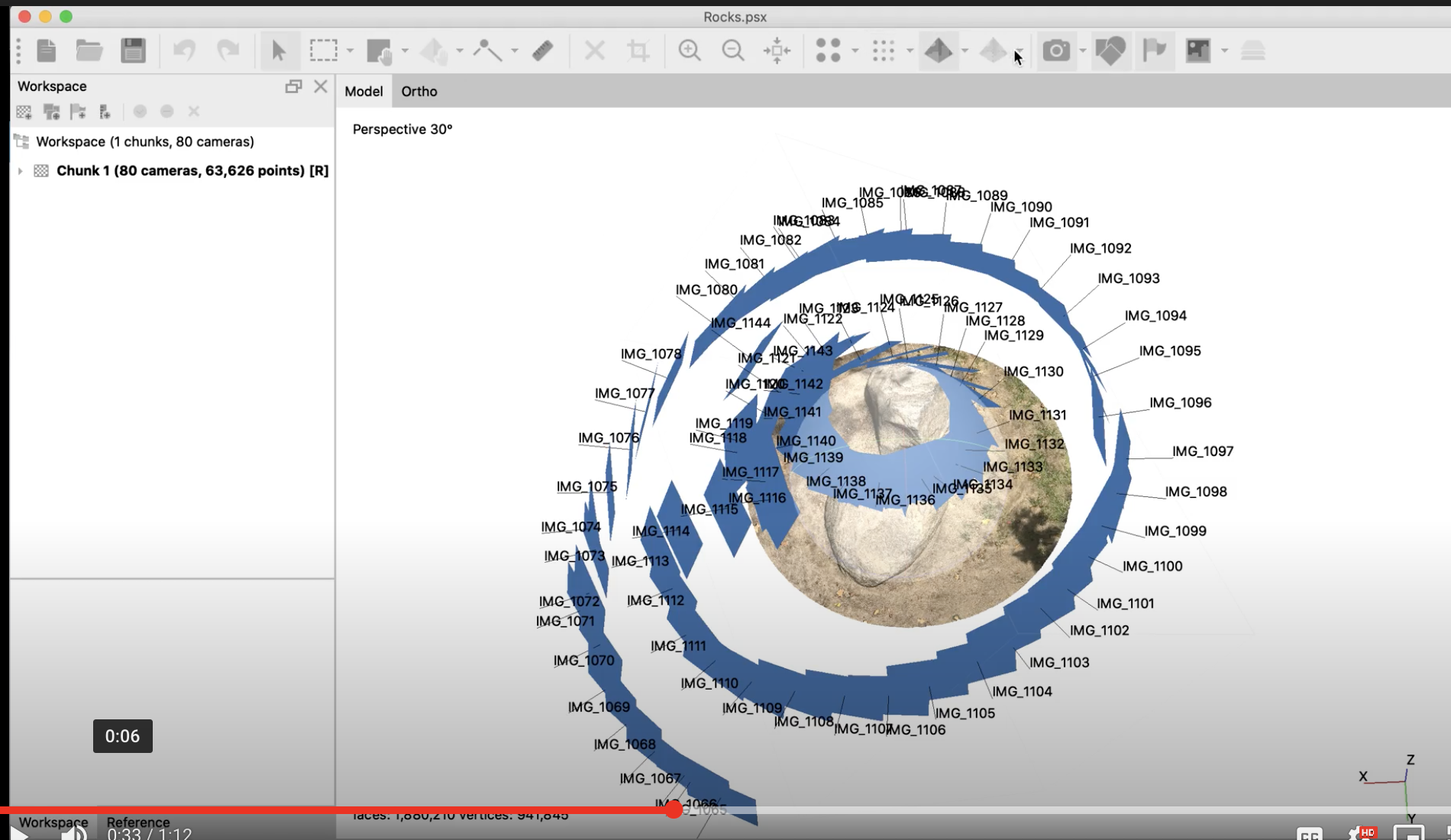
SEE Example Metashap Project Video from Ari
Preparing your Images
Image size is not as crucial in 3-d modeling as it is in 2-d images (a mesh is vector based) Open image first in Camera Raw or Lightroom and apply tonal and color corrections, add slight contrast through exposure dialogue box, sharpen BRIDGE or LIGHTROOM: Image processor save as tifs 2000px long side, uncompressed / if you have 200 images export files as jpgs. This will speed up processing time. There are differing approaches - higher quality / less images or more smaller jpgs. This depends upon your shoot and your computer processor. CLick here for LIGHTROOM WORKFLOW PDF
Metashape: creating 3d mesh from image files
- Workflow<upload camera images 3D WORKFLOW PDF
Vocabulary
OBJ (or .OBJ) is a geometry definition file format first developed by Wavefront Technologies for its Advanced Visualizer animation package. The file format is open and has been adopted by other 3D graphics application vendors. For the most part it is a universally accepted format.
The OBJ file format is a simple data-format that represents 3D geometry alone — namely, the position of each vertex, the UV position of each texture coordinate vertex, vertex normals, and the faces that make each polygon defined as a list of vertices, and texture vertices. Vertices are stored in a counter-clockwise order by default, making explicit declaration of face normals unnecessary. OBJ coordinates have no units, but OBJ files can contain scale information in a human readable comment line.
Photogrammetry- scanning with a camera. To capture a 3D scan with a camera, you take multiple photos of an object, 360 degrees around from both high and low angles. Then you process these photos through a software program that extrapolates a 3D mesh from the 2D photographs. By comparing many photos, the software uses a process called triangulation to figure out the position of the object and the camera. And then extrapolates the shape of that object. It creates not only the 3D mesh that shows the form of the object, but also builds an image map that shows the colors of the surface.
Data in a 3-d printed file: called a mesh, it's made up of a collection of faces sometimes called triangle. Faces are composed of edges, where the edges met is called vertices.
A point cloud is a set of data points in some coordinate system. In a three-dimensional coordinate system, these points are usually defined by X, Y, and Z coordinates, and often are intended to represent the external surface of an object. Point clouds may be created by 3D scanners.
Printer: StratasysJ850 Polyjet printer prints full color using polymer. Shoots inkjet like dots that are hardened under a UV Light.