Visual Thinking - Thursday
Shirine Anand
Somalia Bryant
Ari El Gharsi
Jackson Emmons
Emma Estes
Savannah Gomes
Reneé Simone Hayes
Denise Hewitt
Em Higgins
Robel Jacobs
Julie Lee
Makenna Mitchell
Helena Shan
Noah Shaub
Lukas Sheehan
RESOURCES: WEBSITES
First Web Page - Tim Berners Lee
WC3 Tutorials www.w3schools.com- a resource for anything html / HTML Quick list
http://www.htmldog.com/ another resource for html and css
adobe brackets a modern, open source text editor that understands web design
TextWrangler - a great text editor that allows you to write html easily
Filezilla opensource ftp software for uploading your websites!
lynda.com - video tutorials for everything- including dreamweaver, premiere pro, and indesign, etc
Flavicon Generator / Flavicon.cc
RESOURCES: Color
Hexidecimal Color Codes: http://www.december.com/html/spec/color.html , http://www.w3schools.com/Css/css_colors.asp, Adobe Color
RESOURCES: TYPE/Design
TypeChart - lets you flip through, preview and compare web typography while retrieving the CSS
Google Webfonts - source for fonts
fontsquirrel- create webfont kits to use fontfaces on website - it's free
http://thinkingwithtype.com/letter/ Ellen Lupton Thinking with Type
The Elements of Typographical Style applied to the Web
The Grid System based on Josef Müller-Brockmann
RESOURCES: 3D
see: Metashape General Tips for shooting
see: Metashape tips for scanning body (I recommend only parts)
Saving Images For Web
1. Crop and make basic color adjustments, save as psd or tif to your working folder (NOT website folder).
2. Flatten and Sharpen image using unsharp mask
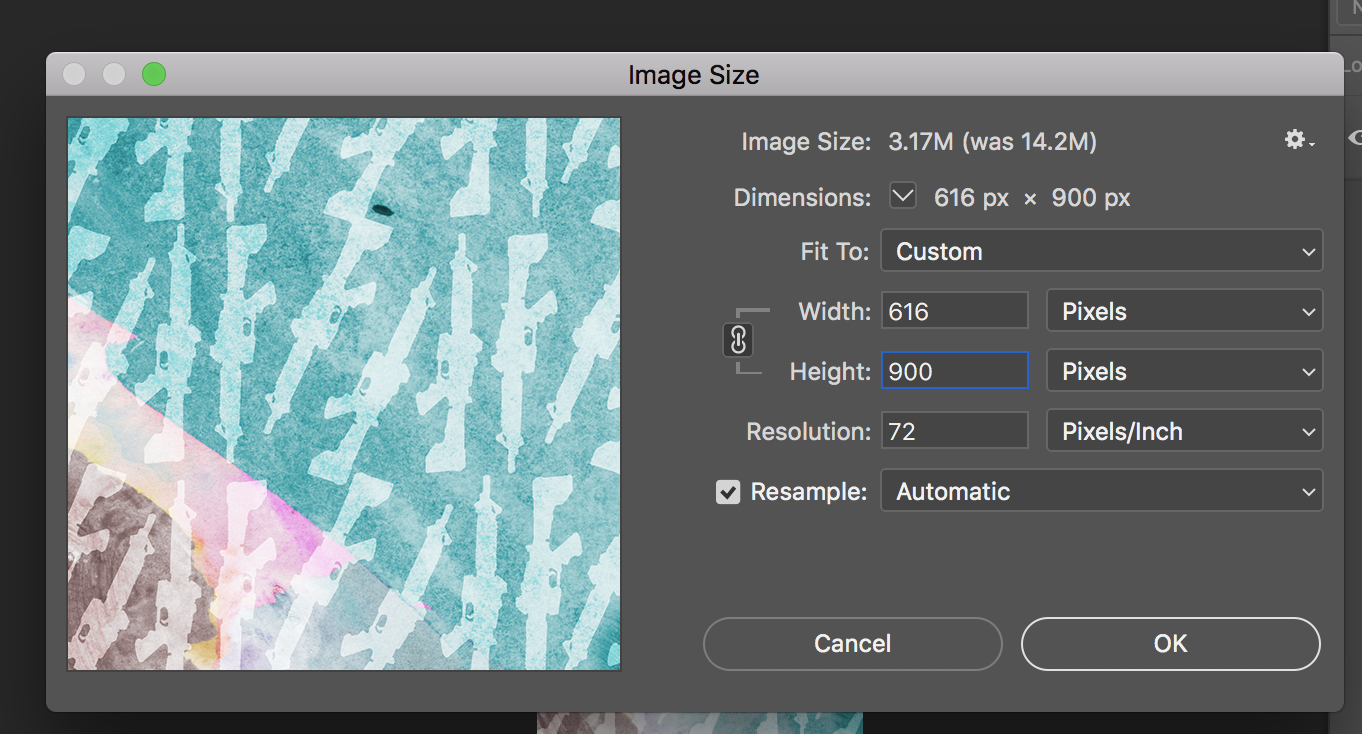
3. Image› Image Size. Resize for your website based on pixel dimension keeping in mind the width of the site (recommend that you choose a standard longest side.) For example vertical images set to a height of 900px allowing the width to vary.(or a horizontal image set to a width of 900px allowing the height to vary)
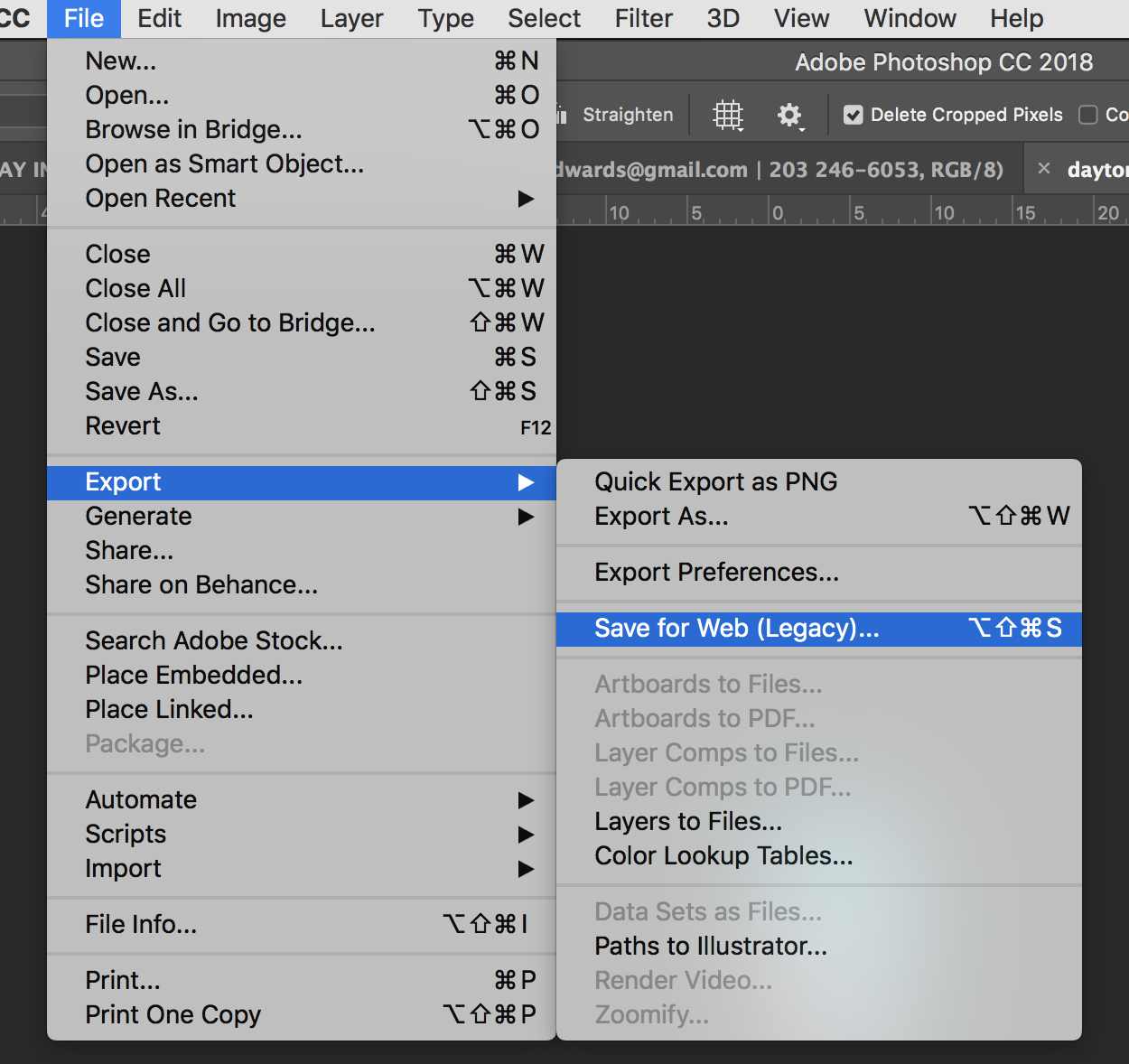
2. File < Export < Save for Web
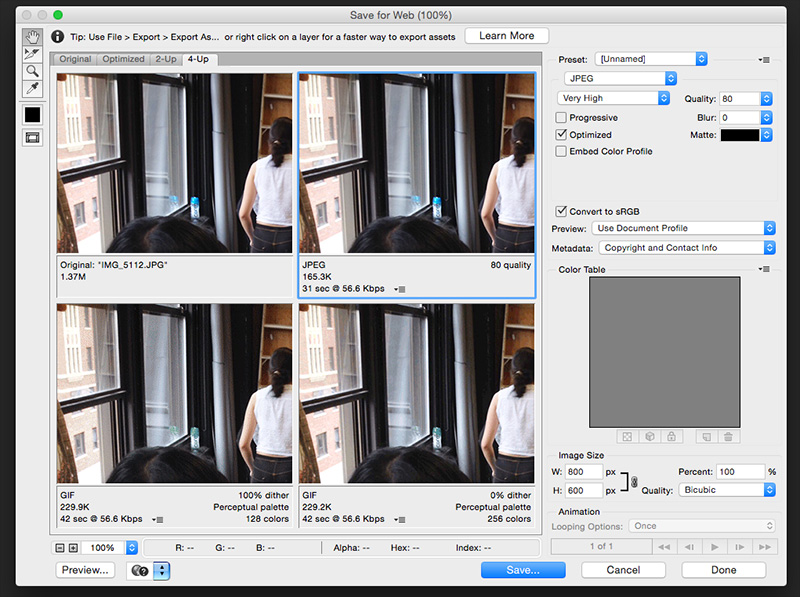
3. Choose Jpg for continuous tone images and choose quality. Convert to Srgb should be checked/ add metadata.
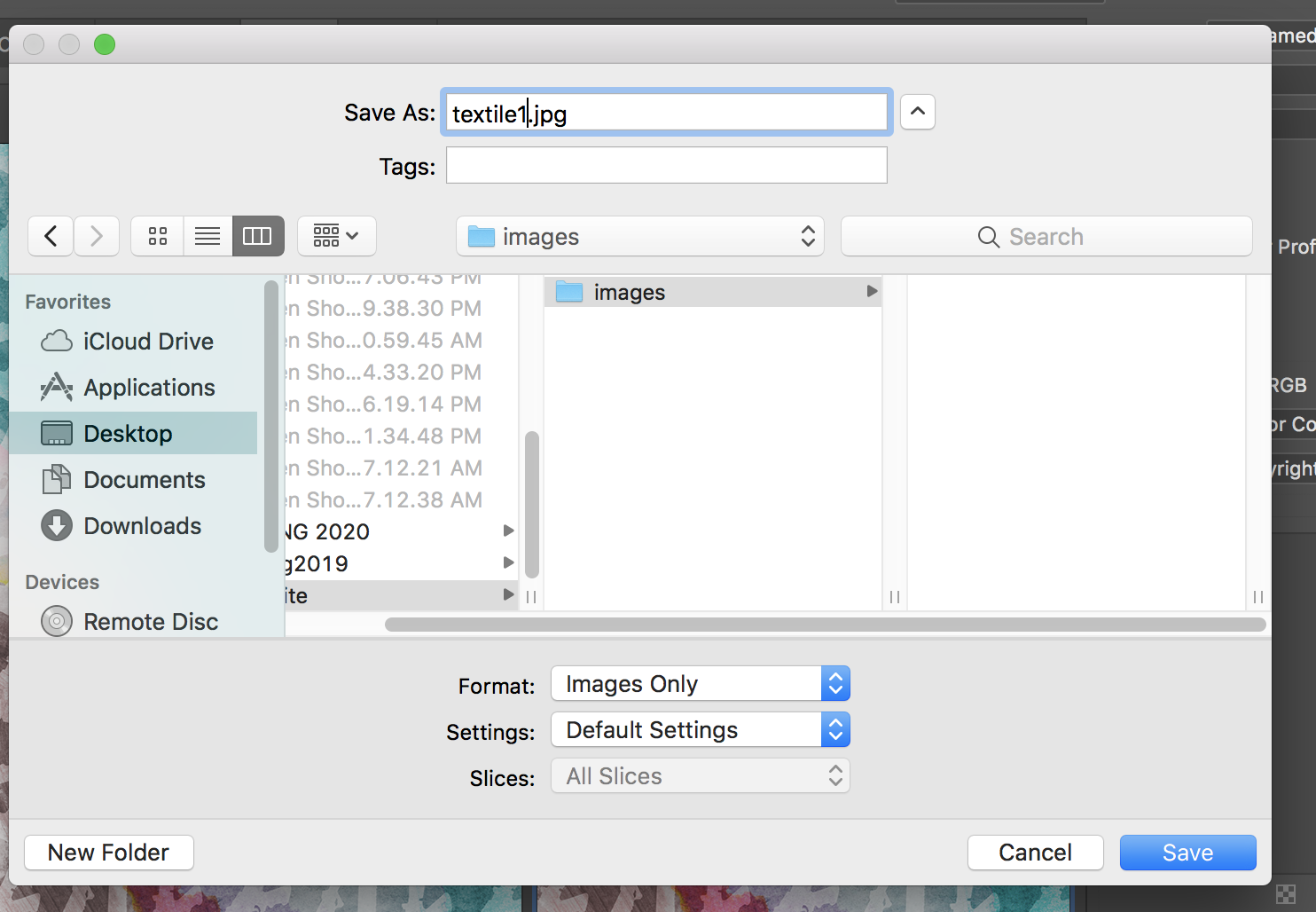
Save into your website images folder. Name accordingly without capitals, spaces, glyphs, etc.
UPLOADING WEBSITE
Uploading websites via File Transfer Protocol (FTP) Using FileZilla
We’ll be using Filezilla, a free application available for download online at:
here )
- Open FileZilla
- Choose File > Site Manager
- Click New Site to create a new connection to your FTP directory.
- Enter the following information, provided to you on a printed sheet.
Host: ftp.photoandimaging.net
Protocol: FTP - File Transfer Protocol
Encryption: Only use plain FTP (insecure)
Logon Type: Ask for Password
User: YOURNETID@photoandimaging.net (Replace YOURNETID with your info, i.e. abc789@photoandimaging.net.)
Password: Leave this field blank (You will be prompted to enter in the next step. Filezilla will not allow you to enter it here.)
Click Connect button
Enter password here.
You can choose to “Save the Password until FileZilla is closed,” but remember to quit FileZilla before leaving the workstation. The password will save during the active connection until FileZilla is closed in order to allow you to connect and upload.When You’re Done
After you’ve uploaded your webpages, folders, CSS files, etc. and have tested your website:
DISCONNECT SERVER -- Click the Server with Red X button at top menu.
QUIT FILEZILLA -- When you are done or leaving the lab. Best practice: Quit FileZilla any time you are not actively uploading or downloading files to your directory. This also helps to prevent too many users connected to the server at once, which can result in slow connections or even inability to connect.URL (AKA your website address)
photoandimaging.net/student-pages/fall-2020/YourNetIDNOTE: Replace YourNetID with your actual NYU Net ID in order to see your site.
i.e. http://photoandimaging.net/student-pages/fall-2020/netidImportant Note: The hosting server is more than capable of handling a robust and dynamic website for each of you. However, it is not configured for uploading and storing of large files. (Read: Use Google Drive!)
Image files should be sized to less than 1MB. Images sized @ 1200 pixels wide will usually be more than adequate, but you can experiment various options in Photoshop both in Image Size and during Export or Save As.
Do not upload videos directly to your FTP directory. When working with videos, it is critical that the files be first uploaded to YouTube or Vimeo (or similar), then embedded-linked to your webpages using the HTML embed codes provided by those hosting sites.Expiration Notice: FTP Accounts and web hosting directories are active during the current semester only. Your access to these files will expire on December 2020. Please remember to backup all files/folders before this date!
UPLOADING to Sketchfab - SEE HOW TO VIDEO
Create a free sketchfab login and password
Please note that this allows for one upload a month.
There are a couple of ways to upload. You may follow directions to upload an .obj, .mtl, jpg. Or an .fbx. Regardless, the files size limit is 50mb.
TO UPLOAD FROM SKETCHFAB:
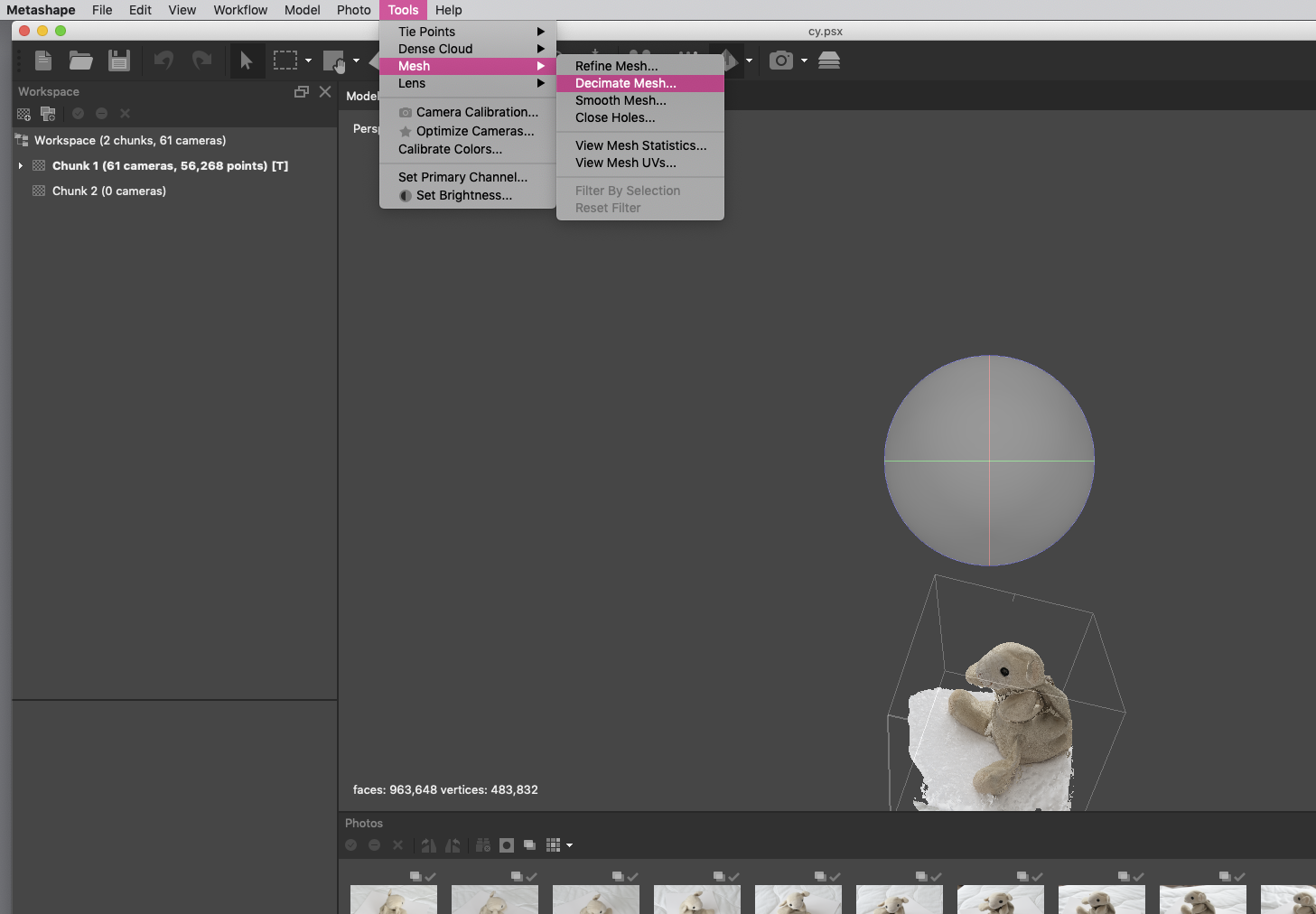
Before you export your model, it is best to make sure the file size will fit your Sketchfab membership. If you're using the free Basic membership, your file size limit is 50MB. If sketch fab does not allow you to upload. Follow directions below for decimating your mesh. If you decimate your mesh you may need to recreate your texture - This will not take long.
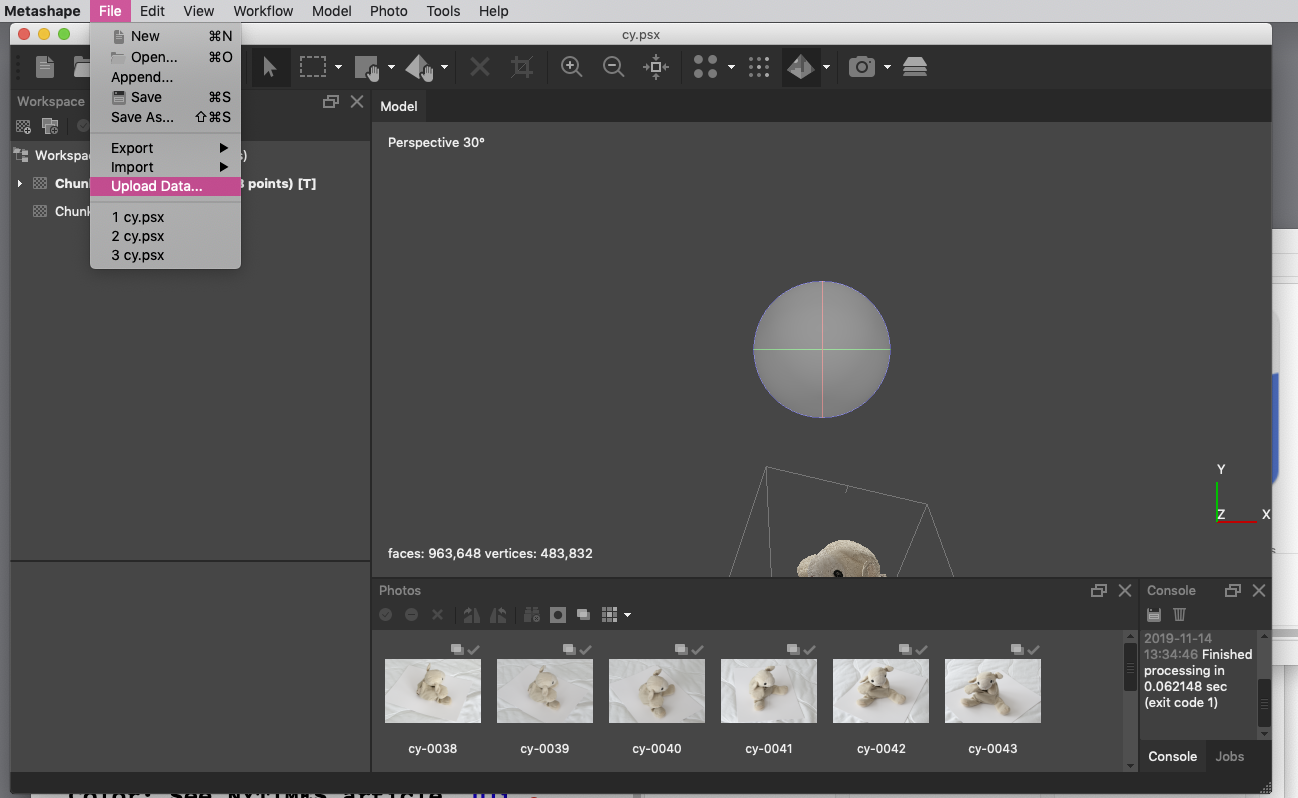
Once your model is ready to go, click File > Upload Data and you'll see the pop-up below.
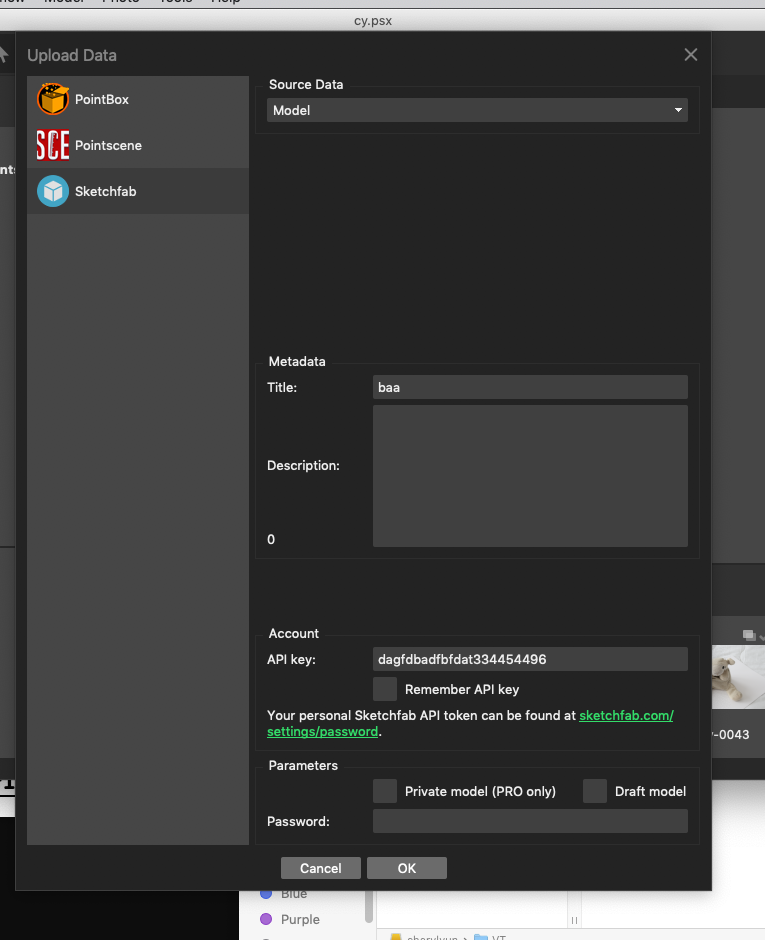
Select Sketchfab from the left side of the menu and choose your model's Source Data from the drop-down: choose Model. You will need the API key which can be found in Sketchfab User Settings
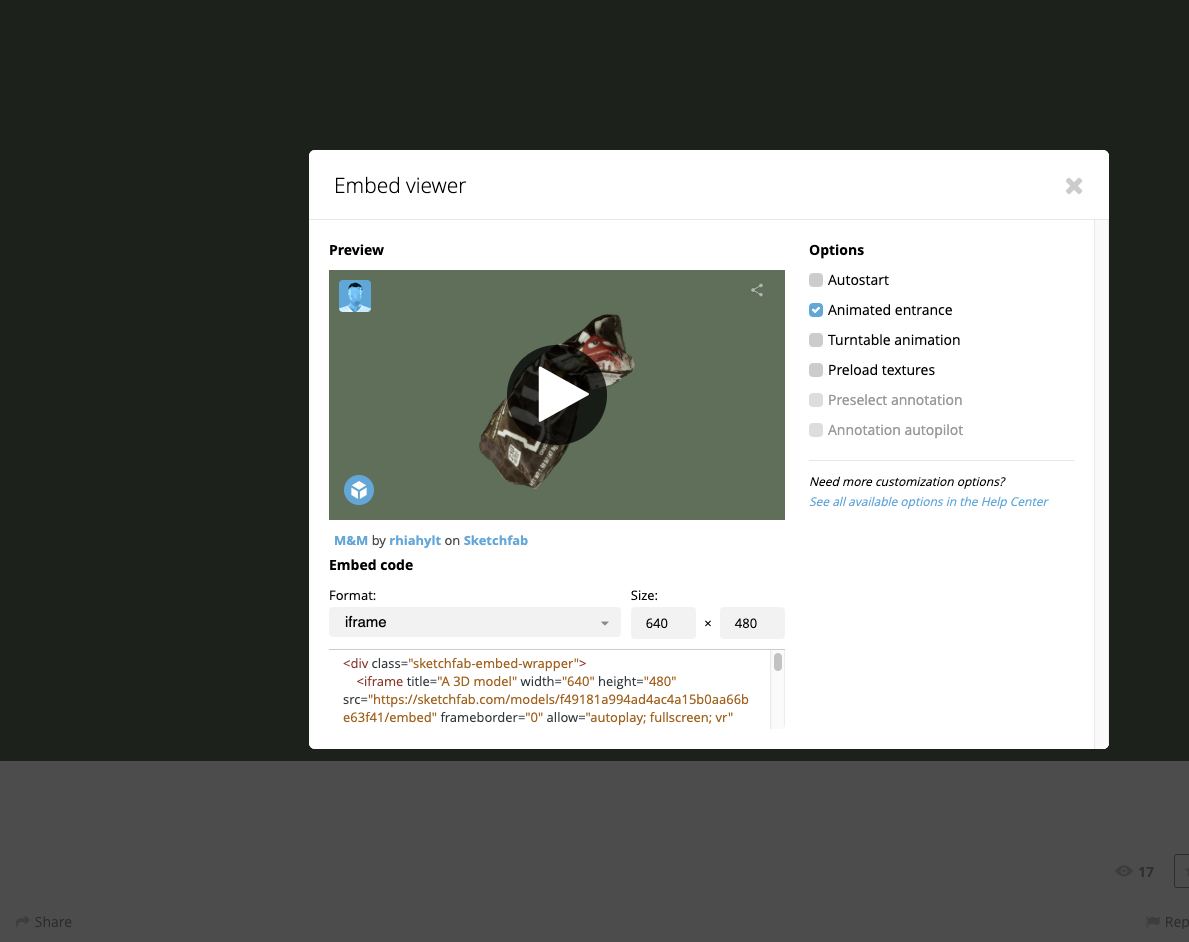
Once your file is uploaded into Sketchfab you can easily embed your file within your projects page. Below your sketchfab video choose embed and copy code. Paste into your projects page in the appropriate place.
WEBSITE LIST
***Watch spelling, are there any there any dead ends (links that don't work)? How does your site flow? Is color distracting? Text size too large or small? Is paragraph text left aligned. Does it take forever for images to load? This could mean you did not resize properly or use "save for web" compression. Clean it up! Please include:
- line drawings and instructions(5)
- "News" project (4)
- Embroidered Text
- Drawing from Medina's workshop
- Shapes (3 shapes and pattern - image of textile
- 3D project: work in progress (if you shot and it did not work, screenshots, etc) sketch fab videos of and final object - please include captions and what worked and didn't work
- Artist book: pdf to download (link) as well as link from Indesign
Writing (see website for details):
- Line
- News Audio
- Shapes/Medinas response
- color response with image and palette from class exercise
- 3D Statement